Run the installer.
Open the file you downloaded. If Windows shows a blue box, click More info, then Run anyway (see the box).
 TuckGem
Get TuckGem
Download
For Windows 10 and 11 (64-bit). Without a licence key, TuckGem is the free version.
English and Thai. It plays from YouTube when you press play.
Clean on Microsoft Defender, Kaspersky, ESET, Norton, Avast and almost every other antivirus program that VirusTotal, Google's virus-scanning service, checked this exact installer with.
One small engine guesses wrong about new programs that aren't code-signed. It's a false positive, and we've emailed them to fix it, so you can download TuckGem with confidence and start using it right away.
See VirusTotal's reportSHA-256 of the installer, to check your download if you want to:—
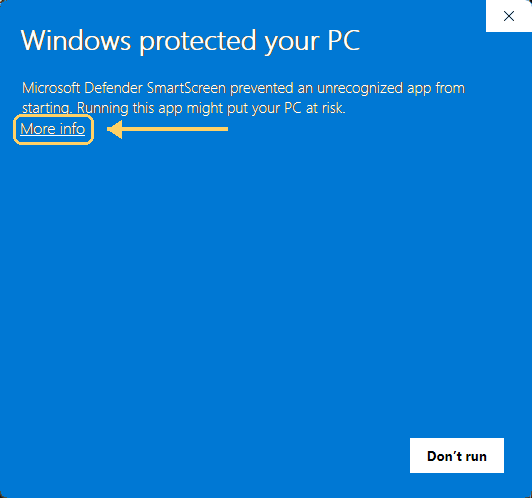
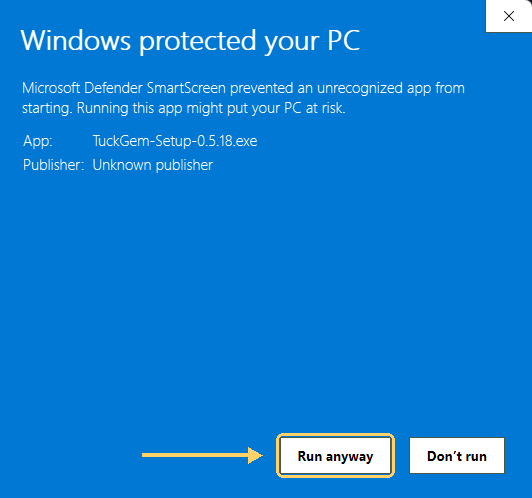
Windows shows this box for new apps until they are widely known. The installer needs no administrator rights.
Open the file you downloaded. If Windows shows a blue box, click More info, then Run anyway (see the box).
Enter your Telegram API ID and API hash (how to get them is just below), your phone number and the code Telegram sends you.
Pick the chats to keep and press Start Backup. Bought a licence? Paste the key from your email (it starts with CV1.) on the Account page, and the free version’s limits are lifted.
TuckGem connects to Telegram from your own computer with a pair of codes that Telegram gives every user, free. You need them once per Telegram account, and getting them takes about a minute. They are yours: keep them private and never share them.
If my.telegram.org only shows an error, wait a little and try again, or try without a VPN. Telegram may change its form; if it looks different, fill in what it asks with any sensible values.
Stuck? Write to [email protected] with your Windows version and what you saw on the screen.